What these alerts are
@PumpGlassWhalesBot sends you a Telegram alert when whales on Binance futures open or close a large long or short position. The bot is part of PumpGlass Pro.
Whales are traders with more than $100K profit over the last month on Binance. Many of them hold positions worth millions of dollars.
Large means large for this particular coin, not just a big number. $500K is an ordinary day for BTC and an event for a small coin. So the bot compares every coin with its own norm and sends only what stands far out of it.
The bot sends two kinds of alerts:
- entries, when whales open a large position;
- exits, when whales close a large position.
Example: accumulation on Q
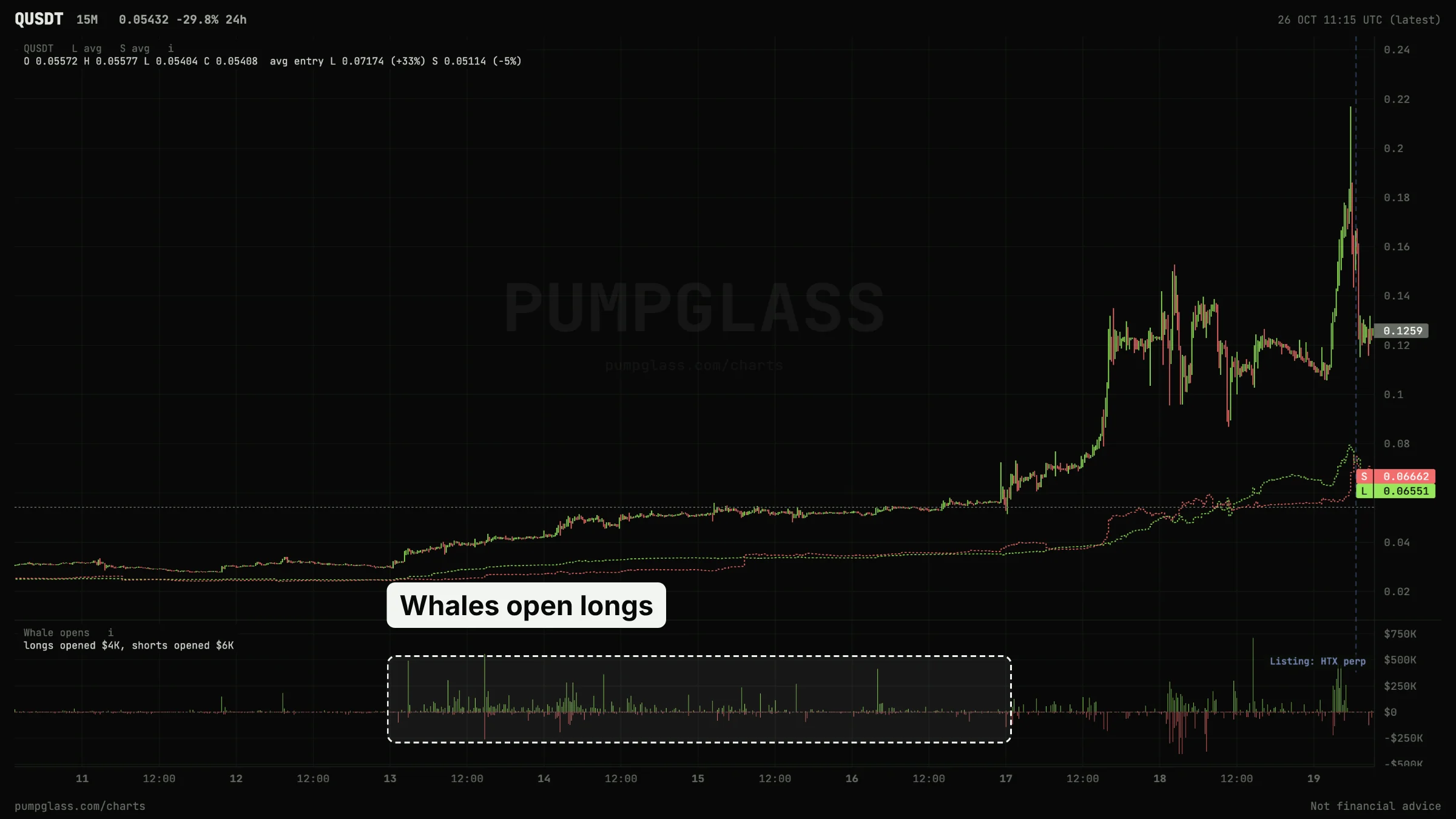
From October 13 to 16 the price of Q barely moved and stayed around $0.04-0.05. During those days whales opened large longs again and again: on the Whale opens panel at the bottom these are the green bars, and the whales' average long entry (green dotted line) rose with them.
On October 17 the price started to climb, and by the peak on October 19 Q was up about 450%.
This is what accumulation looks like: the price stands still while big money goes in one direction. Not every whale entry leads to a move, but these are moments worth seeing while they happen, not after.
Whale entries
How to read an entry alert

Entry strength 40x means the entry is 40 times bigger than usual for this coin. Share of open interest shows how visible the entry is against all open positions.
Sometimes an alert has a "flip from short" (or from long) line: shortly before the entry, whales stood on the opposite side and turned around.
You get at most one alert per hour for the same coin and side. If whales keep adding, you will see it on the chart behind the "Chart" button.
If the other side opens almost the same amount at the same time, no alert is sent: when whales build both longs and shorts, there is no direction.
What an entry means
The meaning of an entry depends on where it happened:
- Longs after a long sideways range → accumulation before a move
- Longs after a drop → a bet on a reversal up
- Longs after a strong rally → buying into the move, higher risk of a pullback
- Shorts after a strong rally → a bet on a pullback
- Shorts after a drop → a bet on further decline
- Shorts in a sideways range → whales expect a drop
- Several entries in a row on one side → whales are confident in the direction
- Whales long, crowd short (or the other way round) → big money stands against the majority
How to set up entries
Open the bot and tap "Alert settings".

Whale exits
How to read an exit alert

The whales' average entry on the chart shows whether they closed in profit or at a loss.
You get at most one exit alert per hour for the same coin and side.
What an exit means
An exit tells you big money is taking its position off. The meaning depends on what the price did before:
- Closed longs after a rally → taking profit
- Closed longs after a drop → leaving a losing long, whales do not expect a reversal
- Closed longs in a sideways range → whales are not sure about a rise
- Closed shorts after a drop → taking profit on a short
- Closed shorts after a rally → leaving a losing short
- Closed shorts in a sideways range → whales are not sure about a drop
Check the whales' average entry on the chart. If whales close longs below their average entry, they exit at a loss.
How to set up exits

General settings


After changes, tap "Save".
Ready-made settings
These are starting points. After choosing, check the alerts-per-day number at the top of the panel.
The whole market
- Entries: both directions, strength 30x (the default, a good middle ground), minimum size $50K-100K.
- Exits: if you want them, 50x and $100K.
- If there are too many alerts, raise the strength or the size, not the daily limit. The limit simply cuts alerts after N of them, it does not keep the strongest ones.
- If there are too few, lower the strength to 15-20x.
Your own coins
For coins you trade or hold.
- Tokens: "Only these", 5-20 coins.
- You can lower the strength to 10-20x and remove the size filter or keep it small: strength is already measured against each coin's own norm.
- Turn on exits for the same coins. This is how you learn that big players are leaving a coin you are in.
How to use the alerts
- An alert is a reason to look at the coin, not an order to buy. Open the chart and judge the situation yourself.
- Check how right whales have been on this coin. Tap "Chart": past whale entries and exits are marked on the chart. If on this coin they often opened longs before rallies and shorts before drops, that is a plus. If they were often wrong, be more careful.
- Look at where they entered. An entry after a long sideways range and an entry at the top after a 50% rally are different stories.
- Check the liquidation map. The liquidation heatmap shows where liquidation clusters and order book walls sit near the price.
FAQ
Why did I get few alerts?
Check the strength, minimum size, token list, quiet hours and daily limit. The number at the top of the panel shows how many alerts your settings would have given over the last week.
Why is there an entry on the chart but no alert?
The entry did not pass your filters, the other side opened almost the same amount at the same time, or the coin already had an alert in the last hour.
Alerts stopped coming. What should I do?
Check the main switch and your subscription. Your settings are kept even after the subscription ends.
Is there a public alerts channel?
No, alerts are set up only in the bot, for each user.
How to get the alerts
Whale alerts come to @PumpGlassWhalesBot and are part of PumpGlass Pro, together with whale history on charts and Pump Catcher without the delay.
PumpGlass shows market data. It is not financial advice.